A video doorbell helps you see who is at your door, communicate with visitors, and keep an eye on your entryway, even when you’re not at home. But when choosing a video doorbell, there’s one practical question worth considering: Should you get a video doorbell with a chime or one without a chime?
A chime is the device that plays an audible sound when someone presses your doorbell. Some video doorbells come with a compatible indoor chime, while others rely on smartphone notifications or require a separately purchased accessory. The right choice depends on how you use your home, whether you want to hear visitors throughout the house, and how much you want to spend on your doorbell setup.
In this guide, we’ll explain how video doorbells work with and without a chime, compare their advantages and disadvantages, and help you decide which option best suits your needs.
Contents
What Is a Video Doorbell Chime?
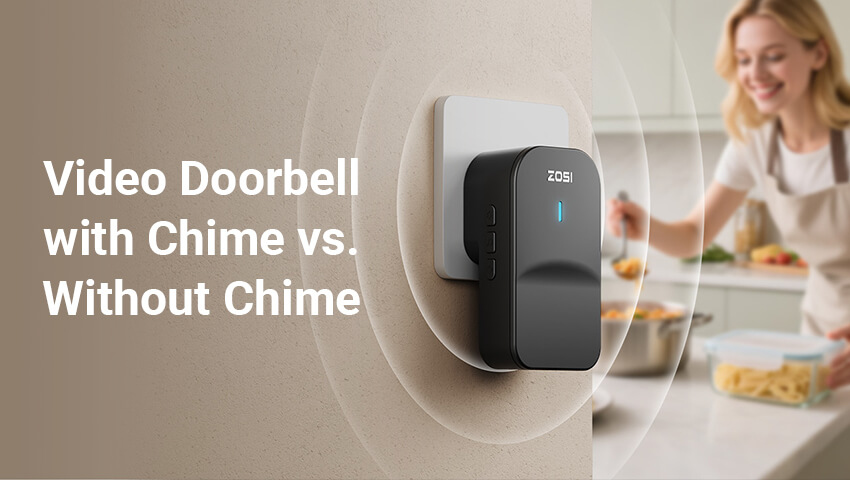
A video doorbell chime is an indoor device that plays a sound when someone presses the doorbell button. Unlike the outdoor doorbell itself, which captures video and audio, the chime alerts people inside the home that a visitor has arrived.
Depending on the model, a video doorbell may support one or more of the following notification methods:
Built-in chime: The doorbell itself produces an audible sound, although this feature is not available on every model.
Wireless indoor chime: A separate device, often plugged into a wall outlet, plays a sound when the doorbell is pressed.
Existing wired chime: Some compatible video doorbells can work with a home’s existing mechanical or electronic doorbell chime.
Smartphone notifications: The doorbell sends an alert to a connected mobile device through its companion app.
Compatible smart home devices: Certain models can announce doorbell presses through supported smart speakers or other devices.
These options are not interchangeable across all products. Before buying a doorbell, check which notification methods the specific model supports.
What Happens When Someone Rings the Doorbell?
With a compatible indoor chime, pressing the outdoor doorbell button triggers an audible sound inside the home. At the same time, the doorbell may send a notification to your phone, allowing you to view the visitor and communicate through two-way audio if the feature is supported.
Without a separate chime, the doorbell can still perform its video monitoring and communication functions, provided the model supports this configuration. However, you may need to rely on your smartphone or another compatible notification device to know when someone rings the bell.
Video Doorbell With Chime: Pros and Cons
A video doorbell with a compatible indoor chime offers a familiar doorbell experience while adding smart security features.
Advantages of a Video Doorbell With Chime
1. Hear visitors without checking your phone
One of the biggest advantages of an indoor chime is that you can hear when someone rings the doorbell without having to keep your smartphone nearby.
Whether you’re cooking in the kitchen, working at your desk, or relaxing in the living room, an audible alert makes it easier to notice visitors while going about your daily routine.
2. Convenient for families and shared households
A chime can benefit everyone in the household, not just the person who installed the doorbell app.
For example, if a delivery arrives while your phone is charging in another room, other family members can still hear the doorbell and respond. This can make a chime particularly useful for busy households.
3. Useful when your phone is on silent
Smartphone notifications can be missed when your device is on silent, Do Not Disturb mode, or placed somewhere you cannot hear it.
An indoor chime provides another way to receive doorbell alerts. This can be especially helpful if you frequently mute your phone while working or resting.
4. Better awareness in larger homes
In a multi-story house or a home with several rooms, you might not always notice a visitor at the front door.
A compatible chime placed in a convenient indoor location can make doorbell alerts easier to hear. Some systems support multiple chimes, allowing you to place them in different areas of your home.
Disadvantages of a Video Doorbell With Chime
1. Potentially higher upfront cost
Some video doorbells include a chime in the package, while others require you to purchase one separately.
If the chime is an optional accessory, remember to include its cost when comparing different doorbell systems.
2. Additional setup may be required
A wireless chime may need to be plugged in, paired with the doorbell, and configured before it works properly. A wired installation may involve checking existing wiring and power requirements.
Wireless models can simplify installation, but they still need to be compatible with the doorbell.
3. Compatibility limitations
Not every video doorbell works with every indoor chime. Some products require a specific brand or model of chime, while others support selected existing wired chimes or compatible smart home devices.
Always check the manufacturer’s compatibility information before purchasing additional accessories.
Video Doorbell Without Chime: Pros and Cons
A video doorbell without a separate indoor chime can be a practical choice if you prefer a simpler setup and are comfortable receiving alerts on your phone.
In this configuration, the doorbell may send notifications through its companion app when someone presses the button. Some models also support compatible smart speakers or other devices as alternative notification methods.
Advantages of a Video Doorbell Without Chime
1. Simpler setup
Without a separate chime, there may be fewer devices to install, pair, or configure.
This can be particularly convenient for renters, apartment residents, or anyone who wants to avoid adding extra equipment to their home.
2. Potentially lower cost
If the doorbell works without a chime and you are happy with smartphone notifications, you may not need to purchase an additional accessory.
This makes it easier to focus your budget on the doorbell’s core features, such as video quality, motion detection, night vision, and two-way audio.
3. Fewer accessories to manage
A doorbell without a separate chime means one less device to find space for and maintain.
For households that already rely on their smartphones for notifications, this can be a straightforward and convenient arrangement.
4. Suitable for people who are frequently away
If you spend much of your time outside the home, smartphone alerts can be particularly useful. You can receive notifications remotely and, when supported, view the live video feed or speak to visitors through the app.
However, remote access depends on the doorbell’s connectivity, power supply, app configuration, and other model-specific requirements.
Disadvantages of a Video Doorbell Without Chime
1. You may miss doorbell notifications
If your phone is muted, the app’s notifications are disabled, or your device is out of reach, you may not notice when someone rings the doorbell.
This can be inconvenient when you are busy at home or when several people share the same living space.
2. Greater reliance on your smartphone
Without an indoor chime, you may need to keep your phone nearby and ensure that notifications are enabled.
Depending on the product, notification delivery can also be affected by network connectivity, phone settings, and app permissions.
3. Less convenient for some household members
Not everyone wants to depend on a smartphone to know when a visitor arrives. Children, older adults, or other family members who do not regularly use the connected app may find an audible indoor chime more convenient.
4. An alternative notification device may still cost extra
If you later decide that smartphone alerts are not enough, you may want to add a compatible wireless chime or smart home device.
Check whether your chosen doorbell supports these options before buying, especially if you expect your needs to change.
Which Video Doorbell Setup Is Best for Your Home?
The best choice depends on your living environment and how you prefer to receive notifications.
Apartments and Small Homes
If you live in an apartment or a small home, a video doorbell without a separate chime may be sufficient.
You might be close enough to your front door to hear visitors, or you may prefer to receive alerts directly on your phone. A simpler setup can also be attractive if you want to avoid additional equipment.
However, if you frequently mute your phone or spend time in rooms where you cannot hear the door, an indoor chime may still be worthwhile.
Large Houses and Multi-Story Homes
For larger homes, a video doorbell with a compatible indoor chime is often the more convenient option.
An audible alert can help you notice visitors when you are upstairs, in the basement, or working in a room far from the entrance.
If the system supports multiple chimes, you may be able to place them in different areas for better coverage. Check the manufacturer’s supported configurations before purchasing additional units.
Families With Children or Older Adults
A chime can make a video doorbell easier for the whole household to use.
Instead of relying on one person’s smartphone, everyone nearby can hear when someone arrives. This can be helpful when family members have different phone habits or do not use the doorbell app.
For households that prefer straightforward, familiar notifications, a chime is often a practical addition.
People Who Are Often Away From Home
If you spend most of the day at work, travel frequently, or manage a property remotely, smartphone notifications may be your priority.
A video doorbell can help you check who is at the door and communicate with visitors remotely when the model supports live viewing and two-way audio.
An indoor chime may be less important while you are away, but it can still be useful when you return home. You do not necessarily need to choose between the two: some systems support both audible indoor alerts and mobile notifications.
Renters and People Who Prefer Easy Installation
If you rent your home or do not want to modify existing wiring, look for a doorbell that supports your preferred installation method.
Some battery-powered video doorbells offer flexible placement, while compatible plug-in wireless chimes can provide indoor alerts without connecting to an existing wired chime system.
Nevertheless, battery power does not automatically mean that every chime accessory will work with the doorbell. Check the product’s power and accessory requirements before installation.
What to Check Before Buying a Video Doorbell
Before deciding whether to buy a video doorbell with or without a chime, consider the following factors.
Chime Compatibility
First, determine whether the doorbell includes an indoor chime, supports a separately sold chime, or works with an existing wired chime.
Do not assume that a wired video doorbell will automatically activate your existing mechanical or electronic chime. Compatibility varies by model.
Power Supply and Installation
Check whether the doorbell is battery-powered, hardwired, or supports both options.
Battery-powered models may offer more flexible installation, while wired models may require a compatible power supply and specific wiring conditions. The chime configuration can also affect installation requirements.
Wi-Fi and App Requirements
If you plan to rely on smartphone notifications, check the doorbell’s network requirements and mobile app compatibility.
Make sure you understand how the device connects to your network, whether remote viewing requires an internet connection, and which notifications you can customize.
Audible Notification Options
Consider where you want to hear the doorbell.
If you need audible alerts in several rooms, check whether the system supports multiple chimes or compatible smart home devices. If you are comfortable with mobile alerts, make sure the app supports the notification features you need.
Core Security Features
A chime is only one part of the overall doorbell experience. You should also consider:
Video resolution: Choose image quality that suits your monitoring needs.
Night vision: Look for suitable visibility in low-light conditions.
Motion detection: Check whether the doorbell can detect relevant activity and reduce unnecessary alerts.
Two-way audio: Useful for communicating with visitors and delivery personnel.
Video storage: Compare supported local or cloud storage options.
Weather resistance: Important for doorbells installed in exposed outdoor locations.
Choosing a doorbell with the right combination of security features and notification options will generally be more valuable than focusing on the chime alone.
FAQs
Can a video doorbell work without a chime?
Yes. Many video doorbells can operate without a separate indoor chime and send notifications to a connected smartphone instead. However, the available notification methods depend on the specific model and its configuration.
Will my phone ring when someone presses the video doorbell?
Your phone may play a notification sound or display an alert when someone presses the doorbell, provided that the model supports app notifications and your phone’s notification settings allow them. The exact behavior depends on the doorbell app, operating system, and configured alert settings.
Can I add a chime to my video doorbell later?
Possibly. Some video doorbells support compatible add-on wireless chimes or smart home devices, while others have more limited options. Check the manufacturer’s accessory list and compatibility requirements before purchasing a separate chime.
Can I use my existing wired doorbell chime?
That depends on the video doorbell model, the type of existing chime, and the home’s wiring and power supply. Some doorbells support existing mechanical or electronic chimes, while others require a dedicated wireless chime. Always check the manufacturer’s installation instructions before connecting the devices.
Conclusion
Choosing between a video doorbell with a chime and one without a separate chime comes down to how you want to be notified when someone arrives.
A video doorbell with a chime is a great choice if you want audible alerts at home, share your living space with family members, or need to hear visitors from different rooms.
A video doorbell without a separate chime may be a better fit if you prefer a simpler setup, want to avoid purchasing extra accessories, and are comfortable receiving alerts on your smartphone.
Before making your decision, check the doorbell’s compatibility, installation requirements, notification options, and essential security features.
With the right setup, you can enjoy the convenience of smart doorbell monitoring while making it easier to stay informed about visitors at your door.