Security cameras have traditionally been designed to do one main thing: record what happens around your property. But as security technology has evolved, cameras can now do more than simply capture video.
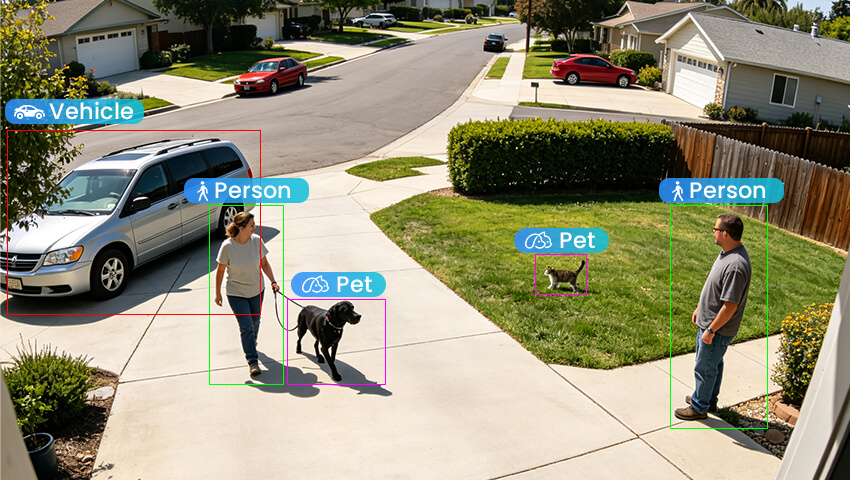
Many modern security cameras use AI detection to analyze activity and identify what may be happening in front of the lens. Instead of treating every movement as the same, an AI security camera can, depending on the model, distinguish between people, vehicles, animals, and other types of activity.
This can make security alerts more useful and help homeowners spend less time checking notifications that don’t really matter.
But what exactly is AI detection in security cameras? How does it work, and what can an AI security camera actually detect?
Let’s take a closer look.
Contents
What Is AI Detection in Security Cameras?
AI detection in security cameras is a technology that uses artificial intelligence to analyze video footage and identify specific types of objects or activity.
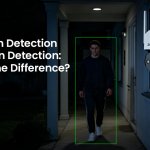
Traditional motion detection mainly looks for movement or changes within a camera’s view. If something moves across the image, the camera may trigger a motion alert.
The problem is that not all movement is important.
A person walking toward your front door may be something you want to know about. But a tree branch moving in the wind, a pet running across the yard, or a vehicle passing on the street may not require your attention.
AI detection adds another layer of analysis. Rather than simply asking whether something moved, the camera can attempt to determine what caused the movement.
For example, a compatible AI security camera may identify activity as a person, vehicle, or animal and then send a notification based on your selected settings.
In simple terms:
Motion detection tells you that something moved. AI detection can help tell you what moved.
The exact capabilities vary by camera model, so it’s important to check which AI detection features are actually supported by the camera you choose.
How Does AI Detection Work?
You don’t need to understand complicated algorithms to understand the basic idea behind AI detection.
The process generally starts when the camera captures video of its surroundings.
1. The Camera Captures the Scene
The camera continuously captures images of the area within its field of view. Image quality is important because the system needs enough visual information to analyze activity.
Factors such as resolution, lighting, distance, and camera angle can all affect how clearly an object appears.
2. Movement Is Detected
When activity occurs, the camera identifies changes in the scene.
This is where traditional motion detection may first come into play. Once movement is detected, the system can analyze the relevant part of the video.
3. The Event Is Classified
After analyzing the activity, the camera determines which category the object most closely matches.
For example, movement near your driveway may be classified as a vehicle, while movement near your front door may be classified as a person.
4. The Camera Responds
Based on your settings, the camera may record the event and send a notification to your phone.
This allows you to receive more specific information about what is happening instead of receiving a generic alert every time movement occurs.
What Can AI Security Cameras Detect?
The AI detection features available on security cameras vary from one model to another. However, several detection types are commonly found in modern systems.
1. Person Detection
Person detection is designed to identify human activity within the camera’s field of view.
This can be useful around front doors, driveways, gates, garages, and other areas where you want to know when someone enters the scene.
For example, if your camera is monitoring your backyard, a person detection alert can help distinguish human activity from other types of movement.
Person detection should not be confused with facial recognition. Person detection generally identifies that a person is present, while facial recognition is designed to identify an individual based on facial characteristics.
2. Vehicle Detection
Vehicle detection is designed to identify vehicles within the camera’s view.
This can be especially useful for driveways, parking areas, garage entrances, and property gates.
For example, if your camera faces your driveway, vehicle detection can help you identify vehicle-related activity separately from other movement.
3. Pet or Animal Detection
Some AI security cameras can also recognize animals or pets.
This can be helpful for homeowners whose dogs or cats regularly move through areas covered by their cameras.
Instead of treating every movement as a potential security event, a compatible camera may classify the activity as an animal.
The exact types of animals that can be detected depend on the camera model and its software.
4. Package Detection
Some advanced security cameras also support package detection.
This feature is designed to recognize packages in supported areas, such as a front porch or delivery area.
If package detection is important to you, make sure the specific camera you are considering supports it. Not every AI security camera includes this feature.
AI Detection vs. Traditional Motion Detection
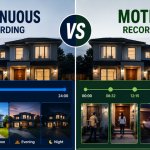
The biggest difference between AI detection and traditional motion detection is the amount of information the camera can provide about an event.
Traditional motion detection focuses primarily on movement. If there is enough change within the camera’s view, it may trigger an alert.
AI detection goes a step further by analyzing the moving object. Depending on the camera, it may determine whether the activity involves a person, vehicle, animal, or another supported object.
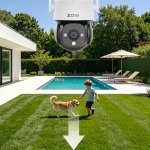
For example, traditional motion detection may alert you whenever your dog runs across the backyard. With AI detection, a compatible camera may recognize the activity as an animal and allow you to configure notifications based on the detection types you care about.
AI detection does not necessarily replace traditional motion detection. Instead, the two technologies can work together to make event detection more specific.
Benefits of AI Detection in Security Cameras
Why is AI detection becoming such a useful feature?
The biggest reason is simple: not all motion deserves your attention.
More Relevant Alerts
Constant motion notifications can quickly become annoying.
If your camera detects every passing car, moving shadow, pet, or tree branch, you may end up receiving alerts that don’t provide much value.
AI detection can help classify certain types of activity so you can focus on the events that are more relevant to you.
Less Time Checking Notifications
Imagine getting several dozen motion alerts throughout the day. You may have to open each notification just to find out that most of them were caused by routine activity.
More specific AI alerts can make it easier to decide which events need your attention.
Easier Event Review
AI detection can also make recorded footage easier to review when your camera or app organizes events by detection type.
Instead of going through every recording, you may be able to focus on events associated with people, vehicles, or other supported categories.
More Flexible Security Monitoring
Different parts of your property may require different types of detection.
You may care about people near the front door, vehicles in the driveway, and animals in the backyard.
AI detection allows compatible cameras to provide more targeted monitoring based on the location and your priorities.
Where Can AI Detection Be Useful?
AI detection can be useful in a variety of residential and outdoor environments.
Front Door
Person detection can help you stay aware of activity near your entrance.
Driveway
Person and vehicle detection can provide more context about activity around your driveway.
Backyard
Animal detection can be useful if your pets frequently move through the camera’s view.
Garage
Person detection can help you monitor activity around a garage entrance or access point.
Larger Properties
For farms, large yards, workshops, or other properties with multiple activity areas, AI detection can help users focus on specific types of events.
The key is to choose detection features based on what you actually want to monitor.
How to Reduce False Alerts With AI Detection
AI detection can help reduce unwanted notifications, but it is not a guarantee that every alert will be perfectly accurate.
Proper camera setup is still important.
Use Detection Zones
If your camera supports detection zones, use them to focus monitoring on the areas that matter.
For example, if your camera captures both your driveway and a busy road, limiting the detection area can help reduce irrelevant activity.
Choose the Right Detection Type
Don’t turn on every available alert simply because the feature exists.
If you mainly want to know when someone approaches your home, person detection may be more useful than receiving notifications for every type of activity.
Adjust Sensitivity
Some cameras allow you to adjust detection sensitivity. If you are receiving too many unnecessary alerts, reviewing these settings may help.
Check the Camera Position
Camera placement can have a major impact on detection performance.
Make sure important areas are clearly visible and avoid pointing the camera toward sources of constant movement whenever possible.
Consider Lighting
Bright sunlight, glare, shadows, darkness, rain, and other environmental conditions can affect detection.
Even an advanced AI security camera can have difficulty identifying an object when it is too far away, partially blocked, or poorly illuminated.
Does AI Detection Require the Internet or a Subscription?
This depends on the specific security camera.
Different manufacturers use different approaches to AI processing. Some cameras can process certain AI functions locally, while others may rely on cloud-based services. Some systems may use a combination of both.
Subscription requirements can also vary.
Some AI detection features may be included with the camera, while other advanced functions may require a separate service plan.
Before choosing an AI security camera, check:
– Which AI detection features are included
– Whether AI processing happens locally or through the cloud
– Whether an internet connection is required
– What storage options are available
– Whether any features require a subscription
– Which features are supported by the specific model
This is especially important if you want specific AI features to continue working during an internet connection problem.
What to Look for When Choosing an AI Security Camera
When shopping for an AI security camera, don’t choose a camera simply because it has the word “AI” in its description.
Look at what the camera can actually detect and how those features fit your needs.
Consider whether it offers:
– Person detection: Useful for doors, yards, entrances, and other areas where human activity matters.
– Vehicle detection: Particularly helpful for driveways, parking areas, and gates.
– Pet or animal detection: Useful for homes where animals frequently appear in the camera’s view.
– Detection zones: Helps focus monitoring on specific areas.
– Adjustable sensitivity: Gives you more control over how the camera responds to activity.
– High-quality video: Clear footage can make it easier for both you and the detection system to identify activity.
– Night vision: Important for monitoring after dark.
– Flexible storage: Consider whether the camera supports local storage, NVR recording, cloud storage, or a combination of options.
You should also consider installation location, viewing angle, connectivity, storage capacity, and app features. AI detection is valuable, but it is only one part of a complete security camera system.
FAQs
Q: Is AI detection better than motion detection?
A: AI detection can provide more information by attempting to identify the type of object causing movement. Traditional motion detection is simpler and can still be useful for detecting general activity.
Q: Can AI security cameras detect people and vehicles?
A: Many AI security cameras support person and vehicle detection. However, available features vary by model.
Q: Can AI cameras detect pets?
A: Some cameras support pet or animal detection. Check the specifications of the camera to see which types of detection are available.
Q: Does AI detection eliminate false alerts?
A: No. AI detection can help reduce irrelevant alerts, but it cannot guarantee perfect accuracy. Lighting, distance, camera angle, weather, and other conditions can affect detection.
Q: Is person detection the same as facial recognition?
A: No. Person detection identifies the presence of a person, while facial recognition is designed to identify an individual.
Q: Do all security cameras have AI detection?
A: No. Some security cameras only offer traditional motion detection, while others provide AI-powered features such as person, vehicle, animal, or package detection.
Conclusion
AI detection is changing the way modern security cameras monitor activity.
Traditional motion detection can tell you that something moved. AI detection can take that information further by analyzing the activity and, depending on the camera, identifying whether it involves a person, vehicle, animal, package, or another supported object.
The result can be more relevant alerts, easier event review, and a more focused security experience.
However, AI detection is not a magic solution. Camera placement, lighting, image quality, detection settings, connectivity, and storage all play an important role in overall performance.
When choosing an AI security camera, focus on the features that match your property and your everyday needs. The goal isn’t simply to have more alerts or more technology. It’s to get the right information at the right time, so you can spend less time sorting through routine activity and more time paying attention to what matters.