
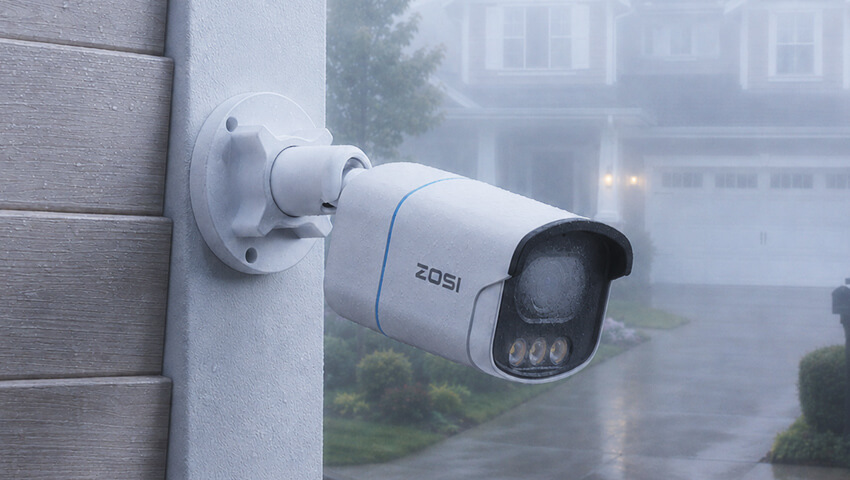
Nothing is more frustrating than checking your security camera footage only to find a blurry, foggy image when you need it most. Lens fog is a common issue for outdoor security cameras, especially during humid weather, rainy seasons, and periods of rapid temperature change.
Fortunately, most lens fogging problems can be prevented with the right camera, installation practices, and maintenance routine. In this guide, we’ll explain why camera lenses fog up and share practical tips to keep your security footage clear year-round.
Contents
Why Does Camera Lens Fog Up?
Camera lens fog occurs when moisture in the air condenses into tiny water droplets on or inside the camera lens.
This typically happens when warm, humid air comes into contact with a cooler surface. As the air cools, it can no longer hold as much moisture, causing water vapor to turn into condensation.
Common Conditions That Cause Lens Fog
- High humidity levels
- Rainy weather
- Early morning dew
- Sudden temperature changes
- Coastal environments with salty, moist air
- Seasonal transitions between warm and cool temperatures
Outdoor security cameras are particularly vulnerable because they are constantly exposed to changing environmental conditions.
How Lens Fog Affects Security Cameras
While lens fog may seem like a minor inconvenience, it can significantly impact camera performance.
Blurry Images and Lost Details
Condensation scatters light before it reaches the camera sensor, reducing image sharpness and making faces, license plates, and other important details difficult to identify.
Reduced Night Vision Performance
Fog becomes even more noticeable at night. Infrared light can reflect off water droplets, creating haze, glare, and bright spots that reduce visibility.
Increased False Alerts
When image quality deteriorates, motion detection and AI-based analytics may become less accurate, potentially leading to missed events or unnecessary notifications.
Potential Long-Term Damage
If moisture enters the camera housing, it can contribute to corrosion, mold growth, and damage to internal electronic components over time.
7 Effective Ways to Prevent Camera Lens Fog
1. Choose Cameras with Strong Weatherproof Protection
A high-quality outdoor security camera should have a weatherproof rating such as IP66 or IP67. These ratings indicate that the camera housing is designed to resist water and dust intrusion.
A properly sealed camera helps minimize the risk of moisture reaching sensitive internal components.
2. Install Cameras in Protected Locations
Although outdoor cameras are designed to withstand the elements, installation location still matters.
Whenever possible:
Mount cameras under roof overhangs or eaves
Avoid areas where rainwater directly strikes the lens
Keep cameras away from sprinkler systems
Allow space around the camera for airflow
Proper placement can significantly reduce exposure to moisture and condensation.
3. Select Cameras with Anti-Condensation Design
Some modern security cameras incorporate ventilation systems, pressure-equalization vents, or anti-condensation engineering to help regulate internal humidity.
These designs reduce the likelihood of moisture becoming trapped inside the camera housing during temperature fluctuations.
4. Keep the Lens Clean
Dust, pollen, fingerprints, and dirt can attract and retain moisture.
To maintain optimal visibility:
Wipe the lens regularly with a microfiber cloth
Remove dirt and debris from the camera housing
Avoid abrasive cleaning materials that could scratch the lens
A clean lens dries faster and is less likely to accumulate moisture.
5. Apply an Anti-Fog Treatment
Anti-fog sprays and coatings create a thin protective layer that helps prevent water droplets from forming on the lens surface.
When using anti-fog products:
Follow the manufacturer’s instructions carefully
Use products that are safe for optical lenses
Reapply periodically as recommended
This can be especially useful in regions with consistently high humidity.
6. Check Cable Connections and Seals
Improper installation can allow moisture to enter the camera housing.
Periodically inspect:
Waterproof cable connectors
Rubber gaskets
Housing seals
Junction boxes
Replace damaged seals promptly to maintain weather resistance.
7. Choose Cameras Built for Challenging Weather Conditions
If you live in a humid, rainy, or coastal environment, investing in a camera designed for harsh outdoor conditions can make a significant difference.
Look for features such as:
Weatherproof construction
Corrosion-resistant materials
Wide operating temperature ranges
Durable outdoor housings
These features help ensure reliable performance throughout the year.
What to Do If Your Security Camera Lens Is Already Foggy
The solution depends on whether the condensation is on the outside or inside of the camera.
Exterior Lens Fog
If moisture is on the outer lens surface:
Gently wipe the lens with a clean microfiber cloth.
Allow the camera to adjust to ambient temperature.
Apply an anti-fog treatment if necessary.
In many cases, exterior fog will disappear naturally as temperatures stabilize.
Internal Condensation
If the fog appears inside the camera housing:
Inspect the housing for damaged seals.
Check cable entry points for water intrusion.
Ensure waterproof connectors are properly installed.
Contact the manufacturer if condensation persists.
Internal moisture usually indicates that water vapor has entered the camera enclosure and may require maintenance or replacement parts.
FAQs
Why does my security camera fog up mostly at night?
Nighttime temperatures often drop faster than daytime temperatures. When warm, moisture-rich air contacts the cooler lens surface, condensation forms more easily.
Can lens fog permanently damage a camera?
Temporary external fog usually does not cause damage. However, persistent internal condensation can increase the risk of corrosion and electronic failure over time.
Does an IP66 rating prevent condensation?
An IP66 rating helps prevent water and dust from entering the camera housing, but condensation can still occur under certain environmental conditions if moisture becomes trapped inside.
How often should I clean outdoor camera lenses?
A monthly inspection is generally recommended. Cameras installed in dusty, coastal, or high-pollen areas may require more frequent cleaning.
Conclusion
Humid weather is one of the most common causes of foggy security camera footage, but it doesn’t have to compromise your home security. Understanding how condensation forms and taking preventive measures can significantly improve image clarity and camera reliability.
By choosing weather-resistant cameras, installing them correctly, maintaining clean lenses, and checking seals regularly, you can reduce lens fog and keep your security footage clear in every season.
A little prevention today can help ensure your cameras capture the details that matter most when you need them.
More Security Guides
Related Posts
 8 Effective Ways to Prevent Intruders at Your Back Door
  Caring for Outdoor Cameras in Winter: A Complete Guide to Cold-Weather Protection
  How to Protect Your Garage and Shed During Summer
  Wide Angle vs Telephoto Lens: Which Lens Should You Choose?
  How to Protect Your Vacant Home During Holidays: Essential Security Tips