Choosing a security camera system is no longer simply about deciding which camera has the highest resolution. One of the first decisions you may need to make is how your cameras will connect and receive power.
Should you choose a wired security camera system or a wireless one?
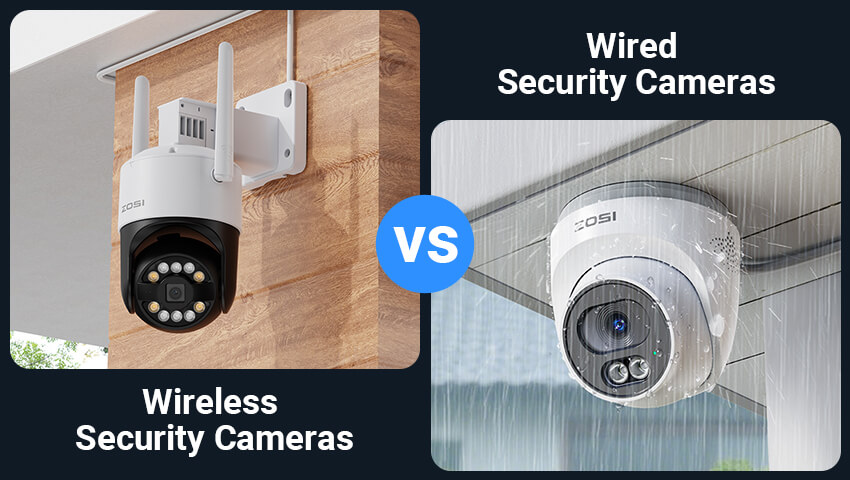
Wired cameras can provide a stable connection, continuous power, and reliable 24/7 recording. Wireless cameras, on the other hand, are generally easier to install and offer more flexibility when you don’t want to run cables through your home or property.
But the difference isn’t always as simple as “wired vs. wireless.”
A Wi-Fi camera may still need a power cable, while a battery or solar-powered camera can operate without a traditional power connection. Understanding these differences can help you choose a security camera system that fits your property, installation needs, and everyday routine.
In this guide, we’ll explain the pros and cons of wired and wireless security cameras and help you determine which type may be right for you.
Contents
What Is a Wired Security Camera?
A wired security camera uses a physical cable to transmit video and, depending on the system, provide power to the camera.
Modern wired security cameras commonly use Power over Ethernet (PoE). With PoE, a single Ethernet cable can carry both power and video data between the camera and a compatible NVR, PoE switch, or network device.
Traditional wired systems may also use separate cables for power and video.
Because wired cameras don’t rely on Wi-Fi for their primary video connection, they can provide a consistent connection for live viewing and recording. They are especially common in permanent installations, larger properties, and multi-camera security systems.
Where Are Wired Cameras Commonly Used?
Wired cameras can be a good fit for:
Large homes with multiple camera locations
Driveways and front yards
Businesses and offices
Warehouses and workshops
New construction or properties where cables can be routed easily
Security systems that require continuous recording
Permanent installations where cameras won’t need to be moved frequently
What Is a Wireless Security Camera?
A wireless security camera typically uses Wi-Fi to transmit video instead of an Ethernet cable.
However, “wireless” can describe more than one type of camera.
Plug-In Wi-Fi Cameras
These cameras connect to your Wi-Fi network wirelessly but still use a power adapter or cable.
They can provide continuous power without requiring a battery to be recharged. This makes them useful when there is a nearby power outlet but running an Ethernet cable would be inconvenient.
Battery or Solar-Powered Cameras
Battery-powered cameras use Wi-Fi for communication and a rechargeable battery for power. Solar-powered models can use a solar panel to help keep the battery charged.
These cameras can be installed in locations where running both network and power cables is difficult or impractical.
So, while all of these cameras may be described as “wireless,” they offer different installation and maintenance experiences.
Wired Security Cameras: Pros and Cons
Pros of Wired Security Cameras
1. Stable Connection
One of the biggest advantages of a wired camera is its physical network connection.
Unlike Wi-Fi cameras, wired cameras don’t depend on the strength of your wireless signal at the camera’s location. This can be particularly useful for outdoor cameras, detached buildings, garages, or areas where walls and distance can weaken Wi-Fi signals.
2. Reliable Power
PoE cameras can receive power through the same Ethernet cable used for data transmission.
This means there is no battery to recharge and no separate power adapter required at the camera in a typical PoE installation.
For users who want cameras running continuously, this can be a major advantage.
3. Well Suited for 24/7 Recording
If you want to record continuously rather than only when motion is detected, wired cameras are a practical option.
Constant power and a stable wired connection make them well suited for systems that record footage to an NVR around the clock.
4. Good for Multi-Camera Systems
Wired systems can be particularly useful when you need several cameras around a property.
Instead of relying on every camera to maintain a strong Wi-Fi connection, cameras can connect through a wired network to a central recording system.
This can make a wired setup a practical choice for larger homes, businesses, and other properties with multiple camera locations.
5. Less Dependent on Wi-Fi Conditions
A busy wireless network can affect the performance of Wi-Fi devices. Multiple connected devices, physical obstructions, and distance from the router can all influence wireless performance.
A wired camera doesn’t depend on the camera-to-router Wi-Fi connection in the same way.
Cons of Wired Security Cameras
1. Installation Requires More Planning
The biggest disadvantage is the cable.
You need to determine where cables will run from the cameras to the NVR, PoE switch, or other network equipment. Depending on your property, this may involve drilling holes, routing cables through walls or ceilings, or using cable channels.
2. Less Flexible After Installation
Once a wired camera has been installed and its cable routed, moving it to another location can require additional cable work.
This makes wired cameras better suited to permanent camera locations.
3. Installation Can Be More Time-Consuming
A DIY wired installation can take more time than simply mounting a Wi-Fi camera and connecting it to an app.
For larger properties, professional installation may also be worth considering.
Wireless Security Cameras: Pros and Cons
Pros of Wireless Security Cameras
1. Easier Installation
Wireless cameras don’t require an Ethernet cable between the camera and your network.
For many homeowners, this can significantly simplify installation.
After mounting the camera, you generally connect it to Wi-Fi through the manufacturer’s app.
Battery-powered models can simplify installation even further because they don’t require a nearby electrical outlet.
2. More Flexible Placement
Without a network cable connecting the camera to your router or NVR, you have more freedom when deciding where to place a wireless camera.
This can be especially useful for:
Apartments
Rental properties
Temporary installations
Indoor rooms
Garages
Sheds
Areas where cable routing is difficult
3. Easier to Reposition
If your security needs change, a wireless camera can generally be moved more easily than a wired camera.
For example, you might initially monitor your front entrance and later decide that the backyard or garage needs more attention.
A wireless camera can make this kind of change simpler.
4. Useful for Hard-to-Wire Locations
Some areas simply don’t have an easy path for Ethernet or power cables.
A battery or solar-powered camera can provide a practical alternative for locations such as detached garages, garden areas, gates, or other outdoor spaces where traditional wiring would be inconvenient.
Cons of Wireless Security Cameras
1. Wi-Fi Signal Matters
A wireless camera depends on a wireless connection to transmit video.
If the camera is too far from the router or separated by thick walls and other obstacles, the connection may become weaker.
Before installing a Wi-Fi camera, it’s a good idea to check whether the intended location has a strong and reliable Wi-Fi signal.
2. Battery Cameras Need Maintenance
Battery-powered cameras eliminate the need for a power cable, but the battery still needs to be recharged periodically.
How frequently this is required depends on factors such as usage, motion activity, weather, camera settings, and battery capacity.
Solar charging can reduce the need for manual charging, but solar performance can also depend on factors such as sunlight and installation conditions.
3. Wireless Networks Can Become Congested
Your Wi-Fi network may already support phones, laptops, TVs, smart home devices, and other connected products.
Adding multiple cameras can increase the amount of traffic on the network.
For larger camera systems, it’s important to consider your router, Wi-Fi coverage, and overall network capacity.
4. Power and Data Are Separate Considerations
A common misconception is that a Wi-Fi camera is completely cable-free.
A plug-in Wi-Fi camera still needs power.
If you want a truly wire-free setup, you’ll need a battery-powered or solar-powered model.
Wired vs. Wireless: Which One Should You Choose?
The right choice depends less on which technology is “better” and more on what you need your security system to do.
Choose Wired Cameras If You:
Want 24/7 continuous recording
Need several cameras around a property
Want a stable wired connection
Own your property and can run cables
Are installing cameras permanently
Are setting up a larger home or business security system
Have areas where Wi-Fi coverage is unreliable
A PoE system can be particularly convenient because one Ethernet cable can provide both power and data to compatible cameras.
Choose Plug-In Wi-Fi Cameras If You:
Want easier installation
Have reliable Wi-Fi coverage
Have power outlets near your preferred camera locations
Don’t want to run Ethernet cables
Want to reposition cameras more easily
Need continuous power without regularly charging batteries
Plug-in Wi-Fi cameras can offer a balance between easy installation and continuous operation.
Choose Battery or Solar Cameras If You:
Rent your home
Cannot easily run cables
Don’t have a convenient power outlet
Need to monitor a remote outdoor location
Want a quick DIY installation
Need greater flexibility in camera placement
Battery and solar cameras can be especially useful for locations where traditional wiring isn’t practical.
What About a Hybrid Security Camera System?
You don’t necessarily have to choose only one type.
A combination of wired and wireless cameras can make sense when different areas of your property have different requirements.
For example:
Front door: A Wi-Fi video doorbell can provide convenient visitor monitoring.
Driveway: A wired PoE camera can provide continuous coverage and reliable recording.
Backyard: A Wi-Fi camera can provide flexible installation without running another Ethernet cable.
Detached garage: A battery or solar camera can be useful if there is no convenient power or network connection.
This approach allows you to choose the connection type based on the specific location instead of forcing every camera in your system to use the same setup.
FAQs
Do wireless security cameras need power?
It depends on the camera.
Plug-in Wi-Fi cameras need a power outlet. Battery-powered cameras use rechargeable batteries, while solar-powered cameras can use solar energy to help maintain their battery.
Can wired security cameras work without the internet?
Many wired camera systems can continue recording locally without an internet connection, especially when cameras are connected to a local NVR.
However, internet access may be required for features such as remote viewing, cloud services, or certain notifications.
Do wireless cameras work if the internet goes down?
It depends on how the camera and recording system are designed.
Some Wi-Fi cameras can continue recording to local storage if the local network and power remain available. However, remote access and cloud-based features generally require an internet connection.
For this reason, it’s important to check the camera’s storage and recording capabilities before purchasing.
Are wired security cameras harder to install?
Generally, yes.
Wired systems require cable routing between the camera and the recording or network equipment. The difficulty depends on the building structure and how accessible the installation routes are.
Wireless cameras can usually be installed more easily because they eliminate the need for a network cable.
Conclusion
The choice between wired and wireless security cameras ultimately comes down to your property and priorities.
Wired cameras are a strong fit when you prioritize stable connectivity, continuous power, 24/7 recording, and permanent multi-camera coverage.
Plug-in Wi-Fi cameras can be a practical choice when you want easier installation without giving up continuous power.
Battery and solar cameras offer even greater installation flexibility when running cables or accessing electrical outlets isn’t practical.
And in many homes, the best solution may be a combination of all three.
Before choosing a security camera, consider where you need coverage, whether power is available, how reliable your Wi-Fi signal is, whether you need 24/7 recording, and how much installation work you’re comfortable with.
With the right setup, your security cameras can fit naturally into your property—and your everyday life.
Related Posts