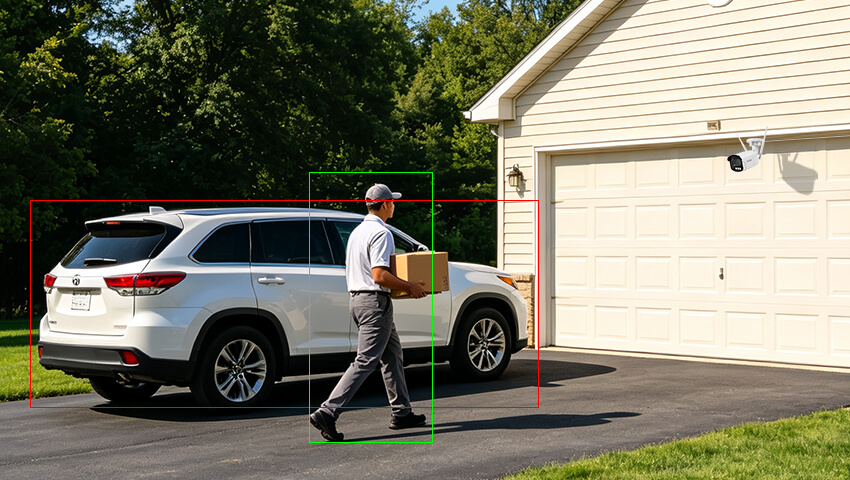
Security cameras are designed to help you stay informed about what is happening around your home or property. But if your phone keeps buzzing every time a tree moves, a car passes by, or a pet walks through the yard, security alerts can quickly become more annoying than helpful.
These unnecessary notifications are known as false alerts or false alarms. While some false alerts are unavoidable, the right camera settings, placement, and detection features can significantly reduce them.
In this guide, we’ll explain what causes false alerts and how to adjust your security camera system for more accurate and useful notifications.
Contents
What Are False Alerts on Security Cameras?
A false alert occurs when a security camera detects activity and sends a notification even though there is no security event that requires your attention.
For example, your camera may send an alert because:
A tree branch moves in the wind
A pet walks across the yard
Car headlights pass through the camera’s view
Rain or snow crosses the lens
Shadows move as sunlight changes
Insects fly close to the camera
Vehicles pass on a nearby road
The goal isn’t necessarily to eliminate every alert. Instead, you want to reduce unnecessary notifications while keeping important alerts, such as people approaching your home or vehicles entering your driveway.
What Causes False Alerts on Security Cameras?
Before changing your settings, it’s helpful to understand what may be triggering your camera.
1. Moving Trees, Leaves, and Shadows
Outdoor cameras often monitor areas containing trees, plants, or other objects that naturally move. Wind can cause branches and leaves to move repeatedly, which may be interpreted as motion.
Changing sunlight can also create moving shadows that trigger motion detection.
2. Weather Conditions
Rain, snow, fog, and strong wind can interfere with motion detection. Raindrops or snowflakes moving across the camera’s field of view may appear as movement.
Heavy weather can be particularly challenging for cameras using general motion detection.
3. Headlights and Sudden Lighting Changes
Vehicle headlights, streetlights, reflections, and changes in sunlight can cause sudden changes in the image.
Depending on the camera and its detection algorithm, these changes may sometimes be interpreted as activity.
4. Pets and Animals
Traditional motion detection generally detects movement rather than identifying what caused it. As a result, a dog, cat, bird, or other animal may trigger the same type of alert as a person.
5. High Motion Sensitivity
If sensitivity is set too high, the camera may respond to very small changes in the scene.
Although higher sensitivity can help detect subtle movement, it can also increase unnecessary alerts.
6. Poor Camera Positioning
Camera placement has a major impact on detection accuracy.
A camera pointed directly at a busy street, for example, may repeatedly detect passing vehicles. Similarly, a camera facing a tree may generate alerts whenever its branches move.
7. Incorrect Detection Settings
Modern security cameras may offer multiple detection options, such as motion detection, person detection, vehicle detection, or pet detection.
If all detection types are enabled when you only need specific events, your camera may generate more notifications than necessary.
8. Outdated Firmware or Software
Camera manufacturers may improve detection performance through firmware and app updates. If your camera is running outdated software, check whether a newer version is available.
How to Reduce False Alerts from Security Cameras
1. Adjust Motion Detection Sensitivity
One of the easiest ways to reduce false alerts is to adjust your camera’s motion sensitivity.
If sensitivity is too high, relatively small movements may trigger an alert. If it is too low, the camera may fail to detect important activity.
A good approach is to start with a moderate sensitivity level and test the camera.
For example:
Reduce sensitivity slightly.
Monitor the alerts for a few hours or days.
Check whether important events are still detected.
Increase or decrease sensitivity as needed.
Avoid immediately setting sensitivity to the lowest possible level just to stop false alerts. You may end up missing genuine security events.
2. Enable AI Person and Vehicle Detection
If your camera supports AI detection, use it instead of relying solely on general motion detection when appropriate.
Traditional motion detection asks:
“Did something move?”
AI detection can help answer a more useful question:
“Was the movement caused by a person or vehicle?”
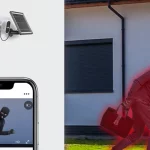
For example, if your camera monitors a front yard, enabling person detection can help distinguish a person approaching the property from leaves moving in the wind.
If you mainly want alerts when a car enters your driveway, vehicle detection may be more useful than general motion detection.
For cameras that support multiple AI detection types, only enable the categories you actually need.
3. Set Up Activity or Detection Zones
Detection zones are one of the most effective ways to reduce unnecessary alerts.
Instead of asking the camera to monitor every part of its field of view, define the areas that matter most.
For example, a front-door camera could focus on:
The front door
The porch
The walkway
The entrance area
You may want to exclude:
A busy road
A neighbor’s property
Trees and bushes
Sidewalks with frequent pedestrian traffic
Areas affected by moving shadows
This helps the camera concentrate on the locations where security events are most important.
4. Reposition the Camera
Sometimes the best solution isn’t a setting—it is changing the camera’s position.
If a camera constantly detects passing traffic, try adjusting its angle so the road occupies less of the frame.
If moving branches are causing repeated alerts, point the camera away from the tree if possible.
When installing an outdoor security camera, try to avoid pointing it directly toward:
Busy roads
Large trees
Highly reflective surfaces
Direct sunlight
Bright outdoor lights
Areas with frequent non-security activity
Instead, position the camera so important areas such as entrances, driveways, gates, and walkways are clearly visible.
5. Optimize the Camera Angle and Installation Height
Camera angle can influence how effectively the system detects people and vehicles.
For example, a camera pointed at a very large area may capture many irrelevant movements. A more focused view can make it easier to monitor the areas that matter.
When possible:
Mount the camera securely to prevent vibration.
Keep the most important area within the central field of view.
Avoid pointing directly toward strong light sources.
Minimize unnecessary background movement.
Make sure the camera is high enough to reduce tampering risks while still providing a useful viewing angle.
For outdoor cameras, also make sure cables, mounts, and other components are properly secured.
6. Adjust Detection Schedules
Not every location needs the same alert settings throughout the day.
For example, a driveway may have frequent activity during the daytime but become much quieter at night. Conversely, nighttime alerts may be especially important for a backyard or side entrance.
If your security camera supports schedules, consider configuring alerts according to your routine.
You might choose to:
Enable more sensitive monitoring overnight
Reduce unnecessary alerts during predictable daytime activity
Schedule specific detection types for certain periods
The ideal schedule depends on your property’s layout and daily activity.
7. Reduce Environmental Triggers
Small environmental changes can sometimes make a noticeable difference.
Check the area around your camera for objects that move frequently.
You can:
Trim branches that frequently move in front of the lens.
Secure loose decorations or objects.
Remove spider webs around the camera.
Clean dirt and debris from the lens.
Reduce direct reflections where possible.
Check whether outdoor lighting is shining directly into the lens.
For outdoor cameras, regular maintenance can help keep the image clear and detection performance consistent.
8. Check Your Camera’s Nighttime Environment
False alerts can sometimes become more noticeable at night.
Headlights, infrared illumination, insects, reflections, and sudden changes in lighting can affect what the camera sees.
If you experience frequent nighttime alerts:
Check whether headlights enter the camera’s field of view.
Look for nearby lights reflecting off walls or windows.
Clean the lens and camera housing.
Check for insects or spider webs around the camera.
Adjust the camera angle if possible.
Review your nighttime detection settings.
If your camera supports different night vision or smart detection modes, test the available settings to find the best configuration for your environment.
How to Balance Fewer Alerts with Reliable Security
It’s tempting to eliminate false alerts by simply lowering sensitivity or turning motion detection off. However, this can create another problem: missing important events.
The best setup isn’t the one that generates the fewest alerts. It’s the one that generates useful alerts.
A good approach is to fine-tune your system step by step:
Step 1: Identify the source of false alerts
Review several recent recordings and determine what is triggering the notifications.
Step 2: Change one setting at a time
Adjust sensitivity, detection zones, or camera positioning individually so you can understand which change makes a difference.
Step 3: Test during different conditions
Check your camera during:
Daytime
Nighttime
Windy weather
Rainy weather
Periods of normal household activity
Step 4: Review the results
Make sure genuine events—such as someone approaching the door—are still detected.
Step 5: Fine-tune as necessary
Every property is different. A setting that works well for a quiet suburban backyard may not work equally well for a busy driveway or apartment entrance.
Best Practices for More Accurate Security Camera Alerts
For a more reliable security camera system, keep these best practices in mind:
- Use AI Detection When Available
Person and vehicle detection can help distinguish meaningful activity from general movement.
- Focus on Important Areas
Use detection zones to prioritize doors, windows, driveways, gates, and other critical areas.
- Don’t Overuse Sensitivity
Higher sensitivity isn’t always better. Find a setting that provides a good balance between detection and false alerts.
- Choose the Right Camera Position
A well-positioned camera can reduce unnecessary activity before you even change the settings.
- Review Your Alerts Regularly
If you notice repeated false alerts from the same source, investigate and adjust your settings.
- Maintain the Camera
Keep the lens clean and remove spider webs, dirt, leaves, or other obstructions.
- Keep Firmware Updated
Check for available firmware and app updates to make sure your camera has the latest supported features and improvements.
- Customize Each Camera
Different cameras may need different settings. A front-door camera, backyard camera, driveway camera, and indoor camera don’t necessarily need the same sensitivity or detection rules.
FAQs
How do I stop my security camera from detecting trees?
If moving branches are triggering alerts, try changing the camera angle or excluding the tree from the detection zone. You can also reduce motion sensitivity or use person and vehicle detection if supported.
Does lowering motion sensitivity reduce false alerts?
Yes. Lowering sensitivity can reduce alerts caused by small movements. However, setting it too low may cause the camera to miss genuine activity, so adjust it gradually and test the results.
Why does my camera detect headlights as motion?
Sudden changes in brightness caused by headlights can sometimes trigger motion detection. Repositioning the camera, excluding the affected area from the detection zone, or using AI-based detection may help reduce these alerts.
Are AI person and vehicle alerts better than motion detection?
For many security applications, AI detection can be more useful because it focuses on specific object types rather than movement alone. However, performance varies by camera model and environment.
Should I turn motion detection off to stop false alerts?
Usually, no. Instead of completely disabling detection, try adjusting sensitivity, using detection zones, and enabling relevant AI detection features. This helps reduce unnecessary notifications while maintaining security coverage.
Conclusion
False alerts are a common challenge with security cameras, but you don’t have to live with constant unnecessary notifications. The right combination of camera placement, detection zones, sensitivity settings, AI detection, schedules, and regular maintenance can make your alerts much more useful.
Start by identifying what’s triggering the unwanted alerts, then make small adjustments and test the results. For the best balance between convenience and security, focus your camera on important areas and use person and vehicle detection when available.
A properly configured security camera shouldn’t make you react to every moving leaf or passing car. It should help you pay attention when something actually matters.
Related Posts