In today’s world, security is a top priority for homeowners. With rising concerns about home invasions, vandalism, and package theft, outdoor security cameras are no longer a luxury—they are essential. Whether you’re looking to keep an eye on your property while you’re away or simply want peace of mind knowing your home is protected 24/7, choosing the right outdoor security camera system is key.
With so many options available, it can be overwhelming to decide which one best suits your needs. In this guide, we will walk you through the most important considerations to help you choose the best outdoor security camera for your home, from features to storage options and installation tips.
Contents
Assess Your Security Needs
Before diving into the world of outdoor cameras, it’s important to assess your specific security needs. Every home is unique, and your camera system should address your concerns and the layout of your property. Here are a few factors to consider when evaluating your needs:
What Are You Protecting?
Think about what areas of your property require surveillance. Common locations for outdoor cameras include:
— Front door: To monitor deliveries or visitors.
— Driveway: To keep an eye on your vehicle(s) and prevent theft.
— Backyard: To secure your garden, patio, or any entry points from the back of your house.
— Side yards or gates: If you have side access to your property, these can often be blind spots for burglars.
Resolution Needs
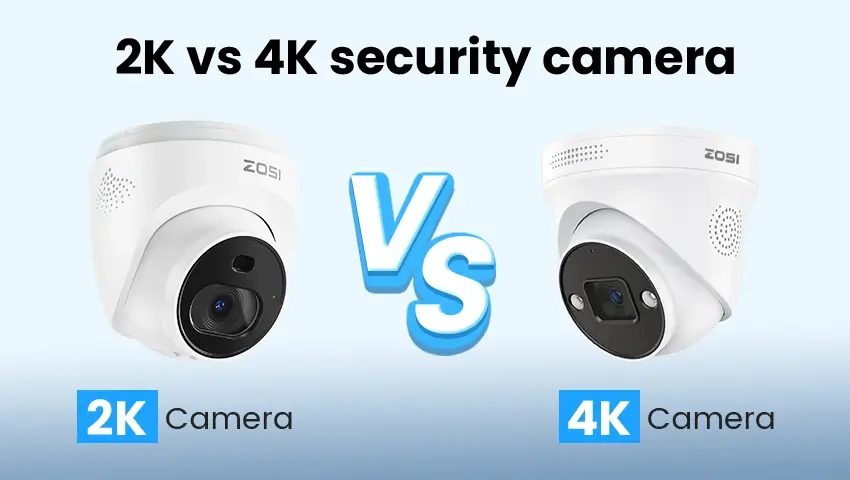
The clarity of your camera’s footage is crucial, especially if you need to identify faces or license plates. For most homeowners, a 1080p HD resolution is sufficient for general security. However, if you want the sharpest images, consider upgrading to 4K resolution, which will allow you to capture fine details even from a distance. Keep in mind that higher resolution footage will require more storage.
Intended Use
Consider whether your primary concern is deterrence or surveillance. If you simply want to discourage criminals, a visible camera with a flashing light might do the trick. But, if you need detailed footage for security purposes, focus on cameras that provide high-quality video and offer features like motion detection or continuous recording.
Key Features to Look For in an Outdoor Camera
Once you have assessed your needs, it’s time to explore the features that will best meet them. Here are the most important features to look for when selecting an outdoor security camera:
Wide Field of View:
A wider field of view allows the camera to cover more area, reducing blind spots. This is essential for monitoring larger areas, such as front yards or driveways, where you may need to capture movement across a broad space. A typical outdoor camera offers a 90° field of view, but models with 120° to 180° coverage are ideal for more expansive monitoring. Cameras with a wide field of view ensure fewer cameras are required to monitor a larger area, offering a more cost-effective and efficient security solution.
Night Vision
Since most security breaches happen at night, night vision is a must-have feature. Cameras with infrared (IR) night vision will capture footage in low-light conditions, allowing you to monitor your property 24/7. Night vision is essential for detecting intruders or unusual movements when it’s dark outside. Some advanced cameras even offer color night vision, which provides clearer images at night and helps distinguish objects or people better than traditional black-and-white night vision. This feature gives peace of mind, knowing you are protected even in the dark hours of the day.
Weather Resistance
Outdoor cameras need to withstand various weather conditions. Look for cameras with a high IP rating (Ingress Protection). For instance, IP65, IP66, or IP67 ratings indicate that the camera is resistant to dust, rain, and even temporary submersion in water. This is especially important if you live in an area prone to extreme weather, such as heavy rain, snow, or freezing temperatures. A weather-resistant camera will ensure long-term durability and optimal performance, providing reliable surveillance without the risk of damage from the elements, making it an essential consideration for outdoor setups.
Motion Detection & Alert
Motion detection is one of the most important features for outdoor security cameras. With motion detection, the camera will activate when it detects movement, saving storage space and preventing false recordings. Many cameras also send real-time alerts to your phone, so you can monitor any suspicious activity as it happens. This feature is especially beneficial for home security, as it minimizes unnecessary footage while ensuring critical events are captured. Look for cameras with adjustable motion sensitivity, which allows you to fine-tune the alerts based on your preferences, such as filtering out small animals or detecting larger movements.
Two-Way Audio
Two-way audio allows you to listen and speak to people via your camera, which is particularly useful for answering the door or communicating with delivery personnel. This feature can also deter intruders, as they may hear your voice and realize they are being watched. It adds a layer of convenience and security, allowing homeowners to interact with visitors without opening the door. Additionally, it’s great for communicating with anyone in your yard or even for remote check-ins. With this feature, you not only gain surveillance capabilities but also a functional intercom system built into your security system.
Wired vs. Wireless Outdoor Cameras
One of the first decisions you will need to make is whether to choose wired or wireless outdoor cameras. Each has its pros and cons, so it’s important to evaluate what works best for your situation.
Wired Cameras
Wired cameras are powered directly through a cable, meaning they do not rely on batteries or Wi-Fi signals. This makes them a reliable option with consistent power and video quality. Since they are hardwired, they typically offer higher video quality and can operate without interruption, providing a stable and continuous stream. However, the installation process for wired cameras can be more complex, as they require running cables through walls or ceilings, which may involve professional help, especially in large homes or buildings. Wired cameras are best for homeowners who want stable and uninterrupted service with less concern about battery life or Wi-Fi strength. They are also ideal for permanent setups in fixed locations where you don’t need to move the cameras often.
Wireless Cameras
Wireless cameras offer more flexibility, as they are powered by batteries or solar panels and connect to the internet via Wi-Fi. They are easier to install since there are no wires to run, making them ideal for renters or anyone looking for a quick, non-invasive installation. Installation is less disruptive, and you can often install wireless cameras by yourself without needing to drill holes in walls or ceilings. However, they do require a strong Wi-Fi signal to function properly, and battery-powered options may need to be recharged or replaced periodically, which could be a hassle for some users. Wireless cameras are also more vulnerable to Wi-Fi outages or interruptions in signal strength, which could impact their performance. Despite these drawbacks, they are ideal for those looking for flexibility in terms of placement and setup.
Storage Options — Where Will Your Footage Go?
After selecting a camera, it’s essential to decide where the footage will be stored. There are a few different options available:
Local Storage
Local storage options, such as microSD cards or Network Video Recorders (NVRs), allow you to store footage directly on-site. This option eliminates the need for subscriptions but may require frequent management, especially if you’re storing large amounts of video. Local storage is a great choice if you prefer to keep everything in-house and avoid recurring costs. However, it may be necessary to regularly check and clear storage, as footage can quickly pile up. If you choose local storage, make sure the camera supports loop recording, which automatically overwrites old footage when the storage is full. This ensures that you don’t lose valuable footage, and the system remains functional without needing constant attention. Local storage is ideal for those who prioritize one-time setup costs over ongoing subscription fees.
Cloud Storage
Cloud storage offers the convenience of storing footage remotely, making it accessible from anywhere. Many camera providers offer cloud storage plans, often with a monthly or annual fee. With cloud storage, footage is automatically uploaded to a secure off-site server, meaning you don’t need to worry about losing data if the camera is damaged or stolen. Cloud storage also allows for easier remote access, enabling you to view recordings from your smartphone or computer no matter where you are. However, the long-term costs of cloud storage can add up over time, especially if you have multiple cameras or want to retain footage for extended periods. Some providers also limit the number of videos stored depending on the plan, so it’s important to review the storage limits and fees before committing.
NVR/DVR Storage
NVR (Network Video Recorder) and DVR (Digital Video Recorder) systems are best for larger setups where multiple cameras are managed and stored centrally. These systems offer more robust storage capacity and allow for the organization of footage from several cameras in one location. NVRs work with IP (internet protocol) cameras, while DVRs are typically used with analog cameras. With NVR or DVR storage, you can store large amounts of footage for extended periods and easily manage recordings through a single system. This option is often favored by businesses or homeowners who require 24/7 surveillance across multiple cameras. NVR/DVR systems can be more expensive to set up initially, but they provide greater scalability and control over your footage. Additionally, many NVR/DVR systems support features like motion detection, automatic overwrite, and remote viewing.
Installation Tips — Getting the Most Out of Your Security Camera
To get the best performance from your outdoor security cameras, proper installation is crucial. Here are some tips to ensure you maximize your coverage:
Camera Placement
— High and Wide: Install cameras high enough to avoid tampering, and angle them to cover key areas like entrances, driveways, and yards. Higher placement increases the camera’s range of view and reduces the likelihood of the camera being vandalized. A good rule of thumb is to mount cameras at least 9-10 feet off the ground for optimal coverage. This also reduces blind spots and ensures that intruders cannot easily disable or block the camera.
— Avoid Obstructions: Ensure your cameras are not blocked by trees, shrubs, or other obstructions that might interfere with the camera’s line of sight. Overhanging branches or other objects can limit the camera’s ability to capture clear footage, especially during windy weather when objects may move. Check for seasonal changes like leaves growing or snow buildup that could block the camera’s view.
— Light Considerations: Make sure the camera is not pointed directly at a light source, as this can affect the camera’s ability to capture clear images. Bright lights, such as street lamps or porch lights, can cause glare or wash out the footage. Instead, try to place cameras in areas with balanced natural light or consider using infrared (IR) night vision cameras to handle low-light conditions effectively.
Power Supply
— Wired Cameras: Ensure the camera is near a power outlet or a power supply to avoid extension cords. Wiring your camera directly into the electrical system ensures consistent power, but it’s important to plan ahead to avoid visible wires that could be tampered with or damaged. Consider using weatherproof cable conduits if the camera will be installed outdoors to protect against the elements.
— Wireless Cameras: Ensure strong Wi-Fi coverage in the area where the camera is placed. If necessary, use Wi-Fi extenders. A wireless camera can only function as effectively as your Wi-Fi connection, so weak signals can cause lag or interruptions in footage. Positioning your camera too far from your router may lead to connectivity issues, so consider using a Wi-Fi extender or a mesh network if you have a large property or multiple obstructions.
Budgeting for Your Outdoor Camera System
Outdoor security cameras come in a wide range of prices. Understanding your budget is important when choosing the right system. Here’s a breakdown of what to expect at various price points:
1. Entry-Level Cameras:
These typically offer basic features like 1080p resolution, motion detection, and night vision. Expect to pay around $50–$150. While these cameras are more affordable, they still provide essential security features that are sufficient for homeowners with basic surveillance needs. Entry-level cameras may lack some advanced features like cloud storage or AI detection, but they are a solid option for those on a tight budget. They are also ideal for smaller properties or less critical areas that do not require high-resolution footage.
2. Mid-Range Cameras:
With better resolution, extended warranties, and additional features like two-way audio or cloud storage, these cameras range from $150–$300. Mid-range cameras offer a good balance of price and functionality, with features that can handle more complex security needs. These cameras often provide higher resolution (1080p or 1440p), better night vision, and may come with added benefits like motion tracking or remote access through mobile apps. If you need more advanced monitoring options, but don’t want to break the bank, mid-range models are a great choice.
3 High-End Cameras:
Premium cameras offer 4K resolution, advanced AI detection, and top-notch build quality. These cameras typically cost $300 and above. High-end cameras provide exceptional video quality with ultra-high-definition footage, ensuring every detail is captured clearly. These models often feature advanced AI capabilities like person detection, facial recognition, or smart alerts, which reduce false notifications. They are also built with robust materials for maximum durability and weather resistance, making them perfect for larger homes or businesses that require 24/7 surveillance across multiple areas.
FAQs
Q: How do I choose the right outdoor security camera for my needs?
A: When selecting an outdoor security camera, the first step is to assess your security needs. Consider factors like camera resolution, night vision capabilities, storage options, and whether you need remote access. It’s also important to evaluate your surroundings and determine key areas that require monitoring.
Q: Do I need professional installation for my outdoor security camera?
A: Many modern outdoor cameras are designed for easy DIY installation. Most cameras come with clear instructions, allowing users to set them up on their own. However, if the installation environment is complex or you’re not comfortable with technology, you might want to consider professional installation services.
Q: Are all outdoor security cameras suitable for outdoor use?
A: Not all cameras are suitable for outdoor environments. Make sure the camera you choose is weatherproof (typically rated IP66 or higher) and designed to withstand temperature fluctuations and harsh weather conditions.
Q: How do I determine if a security camera fits within my budget?
A: When choosing a camera, in addition to the initial cost of the device, consider long-term operating costs, such as storage fees, installation costs, and maintenance. Based on your budget, you can decide whether to opt for a camera with basic features or invest in a higher-end model with more advanced functions.
Conclusion
Choosing the right outdoor security camera is crucial for ensuring the safety and protection of your home. By assessing your security needs, understanding key features, and considering installation and storage options, you can make an informed decision that fits your budget and provides the best coverage. Whether you opt for an entry-level, mid-range, or high-end camera, the right system will give you peace of mind, knowing your property is secure 24/7. Take the time to evaluate your options, and choose the system that meets your specific needs and expectations.
Related Posts