
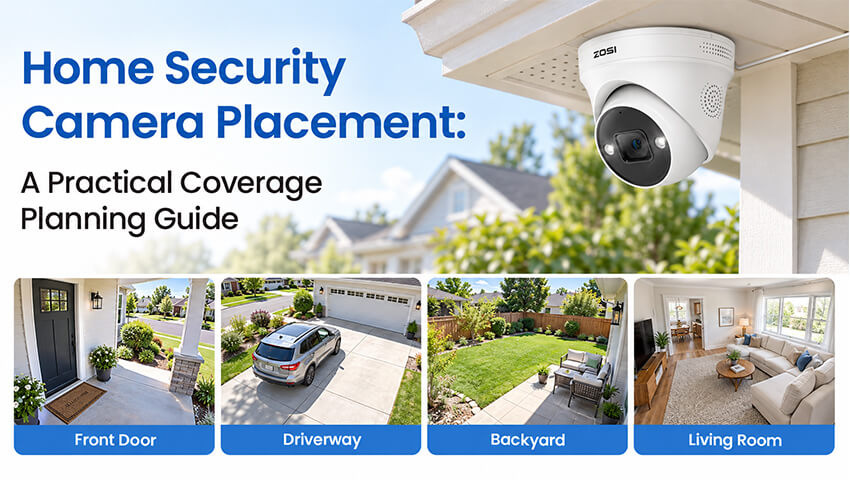
Installing security cameras is an important step toward protecting your home, but where you place them can make a significant difference in what they actually capture. A camera may have high resolution and advanced detection features, yet still miss important activity if it is pointed in the wrong direction or blocked by nearby objects.
The key is to plan your camera placement around your home’s layout and your everyday security needs. From the front porch and driveway to backyard entrances and indoor hallways, each location serves a different purpose.
This guide explains how to choose practical security camera locations, match camera types to different areas, test your coverage, and maintain a setup that continues to meet your needs.
Contents
Identify the Areas That Need Monitoring Most
Before installing cameras, take a walk around your property and identify the places where monitoring would be most useful. Instead of trying to cover every square foot, start with the areas where people enter, leave, or regularly move through your property.
1. Start with Entrances and Access Points
Make a list of your front door, back door, garage entrance, side gates, and other accessible entry points. Consider where visitors approach, where delivery drivers leave packages, and which routes household members use most often.
These locations are useful starting points because they help you understand who approaches your property and when activity occurs.
2. Consider Vehicle and Outdoor Activity
Next, review your driveway, parking area, backyard, and any detached structures you want to monitor. If you have a long driveway or multiple gates, one camera may not provide the viewing angle or detail you need across the entire area.
Prioritize the locations that matter most to your household rather than adding cameras simply to increase the total number of devices.
3. Create a Simple Coverage Map
Sketch a basic floor plan of your home and an outline of the surrounding property. Mark important entrances, pathways, and potential mounting locations. Note nearby trees, walls, fences, and other objects that could obstruct the view.
Also check for available power sources and Wi-Fi coverage if your selected cameras require them. A little planning beforehand can help you avoid unnecessary repositioning after installation.
Where to Place Outdoor Security Cameras
Outdoor camera placement should reflect the layout of your property and the activity you want to observe. The following areas are common starting points for a residential security setup.
1. Front Door and Porch
The front entrance is often one of the most useful places to monitor. Position the camera so it captures people approaching the door and the area where packages are typically delivered.
Check whether porch columns, decorations, door frames, or nearby plants obstruct the view. The camera should capture useful details without pointing excessively toward the street or neighboring properties.
If package monitoring is a priority, make sure the delivery area is clearly visible rather than assuming that a wide view of the porch will capture every detail.
2. Driveway and Garage
A driveway camera can help you observe vehicles entering or leaving and people walking between the driveway and your home. Choose a position that provides a useful view of the main access route and any important parking areas.
Distance matters. A camera may show an entire driveway while providing limited detail of a person or vehicle far away. Consider whether your priority is general activity monitoring or identifying details at a particular location.
Nighttime conditions also deserve attention. Headlights, bright garage lights, and deep shadows can affect the quality of the footage, so test the view under different lighting conditions.
3. Backyard, Side Yard, and Gates
Side yards and backyard entrances can be easy to overlook when planning a camera system. Walk around the property to identify gates, narrow passages, and routes connecting the front and back of the house.
Trees, sheds, fences, and seasonal vegetation may interfere with the view. Choose a mounting location that provides a useful perspective of the relevant access points while keeping the camera protected from unsuitable weather exposure.
For larger yards, consider whether separate cameras are needed for different areas or whether a Pan & Tilt camera would provide useful flexibility when checking different directions.
4. Choose a Suitable Mounting Location
Mount cameras securely and follow the manufacturer’s installation instructions. The best mounting position balances viewing angle, image detail, weather protection, and convenient maintenance.
Before drilling or fixing a camera permanently, check the live view from the proposed location whenever possible. Confirm that important areas remain visible and that the camera can connect reliably to its network and power source.
Where to Place Indoor Security Cameras
Indoor cameras can provide additional visibility in selected shared spaces. Their placement should reflect both practical monitoring needs and the privacy of everyone in the household.
1. Entryways and Hallways
Entryways and hallways are useful locations when you want to observe movement through common access routes. Position the camera to capture the relevant pathway without allowing an open door or tall piece of furniture to block the view.
Consider how people move through the space. A camera that faces a wall or captures only the top of someone’s head may not provide the details you intended to record.
2. Living Rooms and Shared Spaces
A living room or another shared area may benefit from monitoring when there is a clear household need. Choose an angle that covers the intended area without unnecessarily recording private activities elsewhere in the home.
Avoid placing cameras in bedrooms, bathrooms, or other highly private spaces. If your camera supports privacy zones or scheduling features, review those settings to help limit unnecessary recording.
You should also consider who has access to live feeds and saved footage. Thoughtful placement and appropriate account permissions are both important parts of a responsible home security setup.
Match Camera Types to Different Coverage Needs
Not every location requires the same type of security camera. Choosing a device that fits the intended task can help you make better use of your equipment.
1. Fixed Security Cameras for Dedicated Views
Fixed cameras are suitable for locations where a consistent viewing direction is preferred, such as a front entrance, a section of the driveway, or a backyard gate
Pay attention to the camera’s field of view and the distance between the device and the area you want to monitor. A wider field of view can include more of the surroundings, but important details may appear smaller when viewed from farther away.
2. Pan & Tilt Cameras for Adjustable Viewing
Pan & Tilt cameras allow you to adjust the viewing direction remotely, making them useful when you want to inspect different parts of a yard or outdoor space.
However, a camera must physically turn to look in another direction. It cannot continuously capture every direction at once. If uninterrupted monitoring of two separate areas is important, dedicated cameras may be more suitable.
3. Multi-Camera Systems for Separate Areas
Homes with multiple entrances, long driveways, or large outdoor spaces may benefit from cameras assigned to different zones. This approach allows each camera to maintain a dedicated view of an important area.
When planning a multi-camera system, consider recording requirements, network capacity, installation costs, and how easily you can review footage from different devices.
4. Check Power and Connectivity
Before choosing a camera for a specific location, confirm its power and network requirements. Wired, plug-in Wi-Fi, battery-powered, and solar-powered cameras have different installation needs.
A convenient mounting location is not necessarily a practical one if the camera cannot receive reliable power or maintain a stable connection. Check these requirements before finalizing your layout.
Test the Camera View Before Finalizing Installation
A planned camera position may look ideal on paper but perform differently in real conditions. Testing the actual footage is one of the most useful steps in the installation process.
1. Test the View During the Day
Open the live view and walk along the routes you want to monitor. Check whether the camera captures the relevant activity clearly and whether nearby objects block important parts of the image.
Pay attention to the details that matter for your intended use. A view that captures a large area is not automatically useful if people or vehicles appear too small to identify meaningful activity.
2. Check Nighttime Visibility
Review the camera feed after dark. Look for glare from headlights, reflections from nearby windows, strong porch lighting, and areas that become difficult to see in low light.
If the image is unclear, consider whether a different angle or mounting position would improve visibility. Also check that the camera’s available night-vision features are appropriate for the location.
3. Verify Detection and Recording
If your camera supports motion detection or AI-powered person and vehicle detection, test the relevant settings using normal activity. Confirm that notifications arrive as expected and that recorded clips can be accessed and played back.
Detection capabilities vary by model, so review the product specifications and settings rather than assuming every camera supports the same features.
4. Adjust Based on What You Find
If an important area is missing from the view, try adjusting the camera angle or repositioning the device. If the location requires continuous observation from another direction, consider adding a dedicated camera instead of relying on a movable camera to watch multiple areas simultaneously.
Common Camera Placement Mistakes to Avoid
Even a capable camera may deliver disappointing results when its placement does not suit the surroundings. Keep these common mistakes in mind:
– Choosing a location for convenience alone: Check the actual viewing angle and the area you need to monitor before settling on a mounting point.
– Ignoring distance and image detail: Make sure the camera can capture useful information at the distance required for your security goals.
– Overlooking nighttime conditions: Test footage after dark and assess the effect of lighting, glare, and shadows.
– Forgetting power and connectivity: Confirm that the location meets the camera’s power and network requirements.
– Expecting one camera to cover everything: Consider the property’s layout and whether different areas need separate, dedicated views.
– Neglecting privacy: Avoid unnecessary views into private spaces and use available privacy controls appropriately.
– Addressing these issues during planning can help you avoid unnecessary installation changes later.
Maintain Your Camera Placement as Your Home Changes
Camera placement should not be treated as a one-time decision. Your property’s layout and surroundings may change over time, affecting what your cameras can see.
Recheck the view after landscaping, renovations, or changes to outdoor furniture and storage. Trees and shrubs may grow into the camera’s field of view, while new structures can block previously clear sightlines.
Inspect mounting hardware, clean the lens according to the manufacturer’s recommendations, and periodically test connectivity, motion alerts, recording, and playback.
It is also worth reviewing your coverage whenever you add a gate, extend a driveway, or change how an outdoor area is used. Small adjustments can help keep your monitoring setup aligned with your current needs.
FAQs
1. Where Is the Best Place to Install Home Security Cameras?
Common starting points include the front door, driveway, garage entrance, and backyard access points. The best locations depend on your property’s layout, the activities you want to monitor, and the camera’s field of view. Prioritize important entrances and pathways before expanding coverage to secondary areas.
2. How High Should a Home Security Camera Be Mounted?
The appropriate mounting height depends on the camera model, viewing angle, and intended monitoring area. A higher position may make a camera harder to reach, but mounting too high can reduce useful detail. Follow the manufacturer’s recommendations and test the actual footage before finalizing installation.
3. How Many Security Cameras Does a House Need?
There is no universal number. A small home with a few accessible entrances may need fewer cameras than a property with a long driveway, multiple gates, and a large backyard. Start by identifying priority areas, then add cameras where separate viewpoints are necessary for reliable coverage.
4. Should Security Cameras Be Placed Indoors or Outdoors?
Indoor and outdoor cameras serve different purposes. Outdoor cameras are commonly used to monitor entrances, driveways, and yards, while indoor cameras can cover selected shared spaces. Choose devices designed for their intended environment and consider power, connectivity, lighting, and household privacy when deciding where to install them.
Conclusion
Effective home security camera placement begins with understanding your property and deciding which areas matter most. From choosing practical mounting locations to matching camera types with specific needs, every decision should support a clear monitoring goal.
Take time to test your cameras during the day and at night, verify that recording and detection work as expected, and review your setup as your home changes. With thoughtful planning and regular checks, you can build a home monitoring system that makes better use of every camera.
Related Posts
 How to Adjust Security Camera Angle for Best Coverage
  Where Should You Install a Video Doorbell? Best Placement Tips
  How to Improve Security Camera Night Vision: 8 Practical Tips
  Video Doorbell Coverage: How to Get Complete Home Protection
  How to Reduce False Motion Alerts on Security Cameras: 8 Practical Tips