
Contents
Introduction
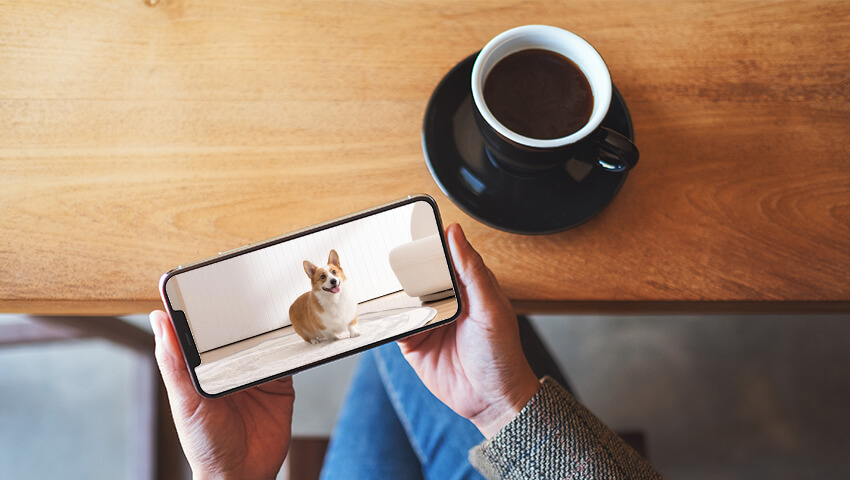
In today’s fast-paced world, pet owners often find themselves away from home for work, errands, or travel. While our furry companions are adorable, their mischievous behaviors can sometimes lead to stress or worry when we’re not around. Thanks to modern technology, monitoring your pet remotely has become easier than ever. Pet cameras, also known as pet monitoring cameras, offer peace of mind and a way to stay connected with your pets throughout the day.
This blog post explores practical tips and tricks for monitoring your pet with a camera, helping you ensure your pet’s safety, well-being, and happiness even when you’re away.
Choosing the Right Pet Camera
The first step to effective pet monitoring is choosing the right camera. Not all cameras are created equal, so it’s essential to consider your pet’s needs and your home environment. Here are a few key factors to consider:
1. Camera Type
– Indoor cameras: These are perfect for keeping an eye on your pets inside your home. They typically offer wide-angle lenses, motion detection, and two-way audio.
– Outdoor cameras: If your pet has access to a yard, outdoor cameras are more durable and weather-resistant.
2. Video Quality
High-definition (HD) cameras are ideal because they allow you to see your pet’s activities clearly. Most modern cameras offer 1080p resolution, which is sufficient for most households.
3. Field of View
A wide field of view helps cover more area, ensuring you don’t miss your pet’s antics. Pan-and-tilt cameras are particularly useful for pets that move around a lot.
4. Connectivity and App Support
Make sure the camera supports a reliable Wi-Fi connection and comes with a mobile app for remote viewing. The app should allow live streaming, notifications, and possibly cloud storage for recorded footage.
Setting Up Your Pet Camera
Once you have your pet camera, proper placement and setup are crucial for effective monitoring.
1. Choose the Right Location
Place the camera where your pet spends most of their time. Common spots include the living room, kitchen, or near their bed. Ensure it captures their primary activity areas without obstructing movement.
2. Adjust Height and Angle
Set the camera at your pet’s eye level if possible. This provides a more natural view of their activities and allows you to observe facial expressions and body language more clearly.
3. Ensure Proper Lighting
Good lighting is essential for clear video. For night monitoring, choose a camera with infrared or night vision capabilities so you can keep an eye on your pet even in low light conditions.
4. Test Connectivity
Before leaving home, test the camera’s connection to your Wi-Fi network and app. Make sure notifications and alerts are working properly.
Using the Camera to Monitor Behavior
Pet cameras can help you track not just your pet’s location but also their behavior patterns. Understanding these patterns can help you address potential issues and improve your pet’s well-being.
1. Observe Daily Routines
Monitoring your pet can help you understand when they sleep, eat, or play. This is especially useful for puppies or senior pets who may have irregular schedules.
2. Detect Separation Anxiety
Some pets experience stress when left alone. Cameras with two-way audio allow you to soothe your pet with your voice or offer reassurance when they seem anxious.
3. Identify Destructive Behavior
Chewing furniture, knocking over items, or other destructive behaviors can be monitored and addressed in real-time. Some cameras even allow you to interact remotely to correct unwanted behaviors.
4. Monitor Health and Activity Levels
Tracking activity levels can help identify early signs of illness or discomfort. If your pet is less active than usual, it may indicate health issues that require attention.
Safety and Privacy Considerations
Monitoring your pet is convenient, but it’s essential to prioritize safety and privacy:
1. Secure Your Wi-Fi Network
Ensure your camera is connected to a secure Wi-Fi network with strong passwords to prevent unauthorized access.
2. Choose Reputable Brands
Opt for cameras from trusted manufacturers with regular software updates and customer support.
3. Mind the Placement
Avoid placing cameras in areas where privacy may be an issue for family members or guests. Always respect household privacy alongside pet monitoring.
Common Mistakes to Avoid
Even with the best camera, mistakes can undermine effective monitoring. Avoid these common pitfalls:
– Ignoring Camera Placement: Poor placement can result in blind spots, limiting your view of the pet’s activities.
– Not Testing Alerts: Motion alerts and notifications are key for real-time updates. Failing to set them properly can make the camera less useful.
– Overreliance on Cameras: Cameras are a helpful tool but shouldn’t replace human interaction, regular walks, or in-person care.
– Neglecting Maintenance: Keep the camera lens clean and ensure firmware is up to date for optimal performance.
Conclusion
Pet cameras have transformed the way pet owners care for their furry friends. By providing real-time monitoring, behavioral insights, and interactive tools, these devices help reduce anxiety, prevent destructive behavior, and maintain a strong bond even when you’re physically away.
Choosing the right camera, setting it up strategically, and using it effectively can make all the difference in your pet’s safety and happiness. Whether it’s keeping an eye on a mischievous puppy or ensuring an older pet is comfortable, a pet camera can be an invaluable addition to your home.
By following these tips and tricks, you can enjoy the peace of mind that comes from knowing your pet is safe, entertained, and loved—no matter where life takes you.
Related Posts
 Ultimate Guide to Alexa Commands: Tips, Tricks, and Smart Home Control
  16 Channel Security Camera System: Monitor Every Angle
  iPhone Security Cameras: Monitor Anywhere with Your iPhone/iPad
  When to Stop Using a Baby Monitor: A Comprehensive Guide for Parents
  5 Must-Know Tips for Using Window Security Cameras at Home