
Storage is one of the most important components of a security camera system. Whether your system runs 24/7 or only records motion events, the reliability and performance of your storage device determine how smoothly everything works—from recording to playback to remote viewing.
Today, the two most common storage options are HDDs (Hard Disk Drives) and SSDs (Solid-State Drives). Both can store surveillance footage, but the way they work and the experience they deliver are very different.
This article breaks down those differences to help you choose the right option for your home or business security system.
Contents
What Is an HDD?
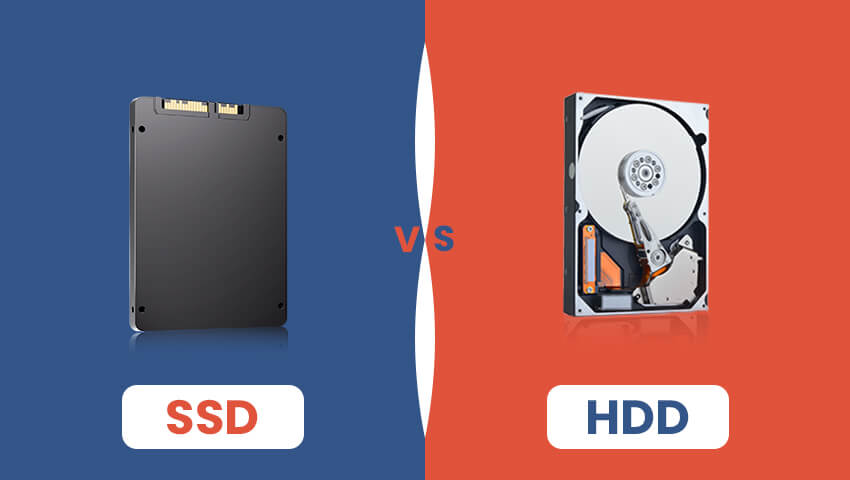
An HDD, or Hard Disk Drive, is a traditional storage device that records data on one or more spinning magnetic disks. A tiny mechanical arm moves across the surface of the disk to read and write information.
Because HDDs have been around for decades, they are widely used in DVR and NVR systems. Many security recorders still ship with HDDs because of their large capacity and long availability in the market.
What Is an SSD?
An SSD, or Solid-State Drive, stores data in flash memory chips. It contains no moving parts—everything is electronic. This makes SSDs fundamentally different from HDDs in structure and behavior.
In recent years, SSDs have become increasingly popular in modern security camera systems, especially those using high-resolution recording or AI-powered features. Their speed and reliability make them particularly suitable for heavy recording workloads.
Key Technical Differences Between SSD and HDD
Even though both SSDs and HDDs store the same type of data, their internal design and operation result in substantial differences in performance, reliability, and suitability for security cameras. Let’s dive deeper into these technical differences.
1. Speed
Write Speed: SSDs can write data hundreds of times faster than HDDs. This is crucial for high-resolution cameras or multi-channel systems that continuously record large amounts of footage. HDDs may lag when multiple cameras are recording simultaneously.
Read Speed: SSDs load video files almost instantly. This improves timeline scrubbing, video playback, and remote access performance. HDDs can be slower to locate and load specific footage.
2. Data Access Method
HDDs use a mechanical arm to physically read/write data from spinning disks. The delay from moving parts can slow access, especially under heavy loads.
SSDs access data electronically through flash memory, allowing near-instantaneous retrieval with no moving parts.
3. Durability
HDDs have mechanical components prone to wear and tear. Shocks, vibrations, or even minor drops can damage the drive.
SSDs are much more resilient to physical impact because they contain no moving parts. This makes them ideal for NVRs installed in locations that may experience vibration or accidental knocks.
4. Heat Generation
HDDs generate heat as the platters spin and the arm moves. Over time, this can reduce the lifespan of both the HDD and the surrounding electronics in your NVR.
SSDs produce minimal heat, which helps maintain system stability, especially in enclosed spaces like home cabinets or small server rooms.
5. Noise
HDDs make audible clicking and spinning noises, which may be noticeable in quiet indoor environments.
SSDs are completely silent, making them more suitable for homes, offices, or other quiet spaces.
6. Power Consumption
HDDs require more power to spin disks and move the read/write arm, especially under continuous 24/7 operation.
SSDs consume less energy, reducing electricity usage and helping devices run cooler.
7. Lifespan and Reliability
HDDs are prone to mechanical failure after prolonged use, particularly in high-write scenarios common in surveillance systems.
SSDs handle repeated read/write cycles better, with most modern SSDs rated for thousands of terabytes written, making them more reliable for continuous surveillance.
8. Vibration and Environmental Sensitivity
HDD performance can degrade in environments with constant vibration or temperature fluctuations. This can lead to read/write errors or even drive failure.
SSDs tolerate vibration, shocks, and a wider temperature range, offering more stable operation in various environments, including industrial settings.
9. Fragmentation
HDDs can suffer from fragmentation, where files are scattered across the disk, slowing access speeds over time.
SSDs are not affected by fragmentation since data is electronically stored and accessed directly, maintaining consistent performance.
10. Data Consistency During Power Loss
Some HDDs may experience delayed writes or corruption if power is suddenly cut during recording.
Many modern SSDs include power-loss protection, which reduces the risk of data loss during unexpected outages.
Advantages and Disadvantages of SSDs and HDDs
Advantages of HDDs
• More affordable storage, especially for large capacities
• Suitable for systems that require long retention
• Long-standing, proven technology
Disadvantages of HDDs
• Slower recording and playback speeds
• Mechanical parts increase failure risk
• Higher noise and heat output
• Less ideal for multi-channel 4K or AI systems
Advantages of SSDs
• Extremely fast read/write performance
• High durability with no mechanical components
• Silent operation and low heat output
• Better stability for continuous 24/7 recording
• Faster playback and timeline searching
• Improved experience for AI-powered features
Disadvantages of SSDs
• Higher cost per GB
• Maximum capacity is generally smaller than HDDs
• May not be necessary for low-resolution systems
SSD vs HDD for Security Cameras
1. Multi-Camera Recording Performance
High-resolution cameras produce large data streams. SSDs handle simultaneous writing more efficiently, reducing frame drops or stutters.
2. Playback and Remote Viewing
Searching through footage or scrubbing a timeline loads much faster on SSDs. HDDs may lag, especially with multiple video feeds.
3. AI and Smart Features
Advanced features like:
• Human/vehicle detection
• Advanced motion tracking
• Smart search
run more smoothly when data is stored and accessed at SSD speed.
4. Reliability in 24/7 Recording
Security systems often run continuously. SSDs generally maintain stable performance and have fewer failure points, while HDDs may degrade mechanically over time.
5. Heat and System Stability
Lower heat reduces stress on the NVR and helps prolong the device’s overall life. SSDs are better in this aspect.
HDD or SSD: Which Should You Choose?
You should consider an HDD if:
• You need large storage capacity on a budget
• Your system records at lower resolution
• You require months of storage retention
• You don’t frequently review or scrub footage
HDDs are still reliable for basic security systems.
An SSD is the better option if:
• You have 4K or high-resolution cameras
• You use AI-powered detection or color night vision
• You frequently review footage
• You want more stable and responsive playback
• Your NVR is installed in a home environment where heat or noise matters
• You want longer device lifespan and fewer maintenance issues
SSDs excel in modern, high-performance security setups.
FAQs
1. Can ZOSI NVRs use both HDDs and SSDs?
Yes. Most ZOSI NVRs support both. Check your model to confirm before purchasing.
2. How long can an SSD last in a security recorder?
Many SSDs last 5–10 years even under 24/7 workloads.
3. Do SSDs improve playback speed?
Yes. SSDs significantly reduce lag when reviewing or searching through footage.
Conclusion
Both SSDs and HDDs are valid options for storing security footage, but they serve different needs.
Choose HDD if capacity and cost are your top priorities.
Choose SSD if you want speed, reliability, quiet operation, and the best performance for modern high-resolution or AI-powered systems.
As surveillance technology evolves, SSDs are becoming the ideal storage choice for users looking for a smoother, more responsive, and more durable security experience.
Related Posts
 Trail Camera vs. Security Camera, Which is Better for Home Security?
  4K vs 1080p: Which Security Camera Resolution is Best for You?
  UHD vs QHD: Which Security Camera Is Better?
  UTP vs STP: Choosing the Right Cable for Your Security Camera System
  From 1080p to 1440p: What Upgrading Your Security Camera Resolution Brings